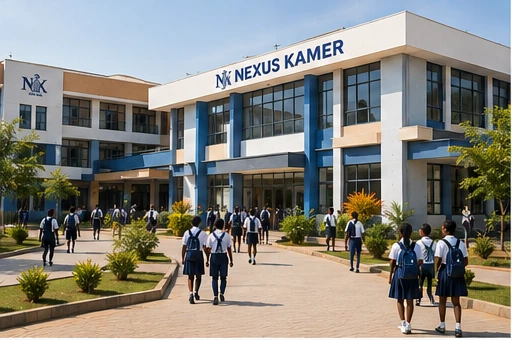

Digitizing Lewa

One Connected Platform for Every School Community

Nexus Kamer connects school operations, educators, parents and students in one place — from admission through enrollment, academics, attendance, fees and reporting.

  • Offline-First
  • Secure & Private
  • English & Français
African principal or administrator working at a laptop — natural working moment
app.nexuskamer.com / principal

Principal Dashboard

Term 2 · 2025/2026 · All sections

Illustrative data
Enrolled

1,284

Across 28 classes

Attendance today

94.2%

Marked in 26 of 28

Fees collected

78%

Term 2 invoices

Pending approvals

12

Admissions & permissions

Attendance, last 8 weeks

%

Needs your decision

Admission · Form 17 applications awaiting reviewReview
Permission request3 parent requests, Form 4BOpen
Payment verification2 transfers to reconcileVerify

Designed for the way different schools are run

Nexus Kamer is configured per school, so the same platform fits a small primary school and a multi-section secondary campus.

How configuration works →
  • 01 Primary Schools
  • 02 Secondary Schools
  • 03 Private Schools
  • 04 Public Schools
  • 05 Faith-Based Schools
  • 06 International Schools
Platform overview

Everything Your School Needs. One Platform.

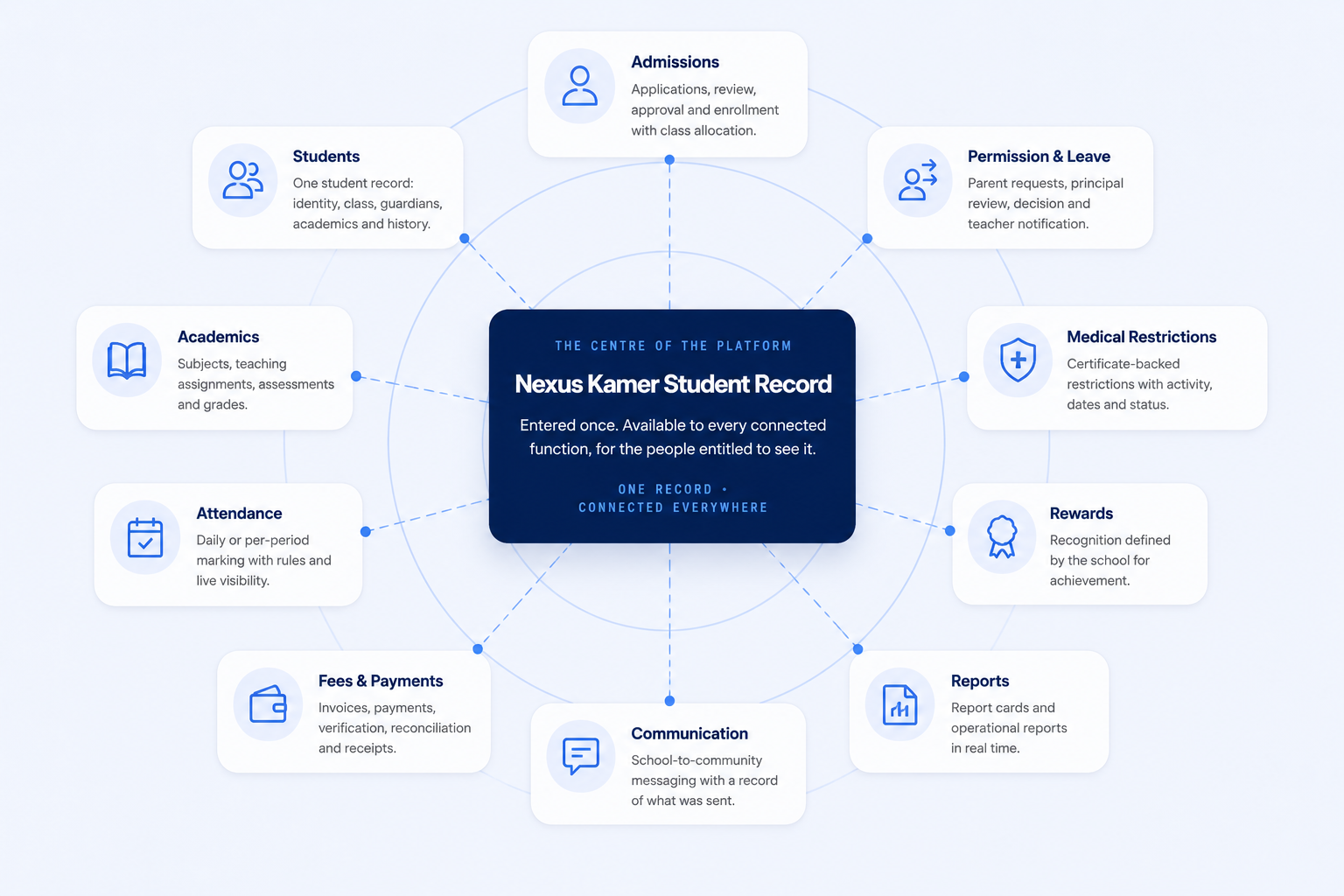
Ten connected areas of school operation around a single student record — so information entered once is available everywhere it is needed, and nowhere it should not be.

Nexus Kamer Student Record connecting admissions, students, academics, attendance, fees and payments, communication, reports, rewards, medical restrictions, and permission and leave workflows.
One record · connected everywhereScroll sideways to explore →
  • Admissions — applications, review, approval and enrollment with class allocation.
  • Students — one student record: identity, class, guardians, academics and history.
  • Academics — subjects, teaching assignments, assessments and grades.
  • Attendance — daily or per-period marking against the school's rules.
  • Fees & Payments — invoices, payments, verification, reconciliation and receipts.
  • Communication — school-to-community messaging with a record of what was sent.
  • Reports — report cards and operational reports.
  • Rewards — recognition defined by the school.
  • Medical Restrictions — certificate-backed restrictions with activity, dates and status.
  • Permission & Leave — parent requests, principal review, decision and teacher notification.
Workflow-first

Built Around the Way Schools Work

School work does not happen in modules. It happens in sequences — a request becomes a decision, a decision becomes a record, a record becomes a report. Nexus Kamer follows those sequences from beginning to end.

  1. STAGE 01

    Admissions

    Application, review and approval

  2. STAGE 02

    Enrollment

    Record created, class allocated

  3. STAGE 03

    Academics

    Teaching, assessment, grades

  4. STAGE 04

    Attendance

    Marked to the school’s rules

  5. STAGE 05

    Finance

    Invoice, verify, reconcile, receipt

  6. STAGE 06

    Reporting

    Report cards and oversight

Fees workflow

Invoice → Payment → Verification → Reconciliation → Receipt → Notification

Permission workflow

Parent request → Principal review → Decision → Teacher notification

Medical restriction

Certificate → Restriction → Affected activity → Dates → Status

Roles

Made for Every Role in Your School

Each role sees the part of the school it is responsible for — and only that part.

African principal in a modern school office, working at a laptop
School Leaders

Run the school from one view

Leadership sees the whole school — population, attendance, academics, finance and everything waiting on a decision.

  • Dashboards across every class and section
  • Approvals for admissions and permissions
  • Academic, attendance and fee reporting

Principal · School overviewIllustrative data
Students1,284
Attendance94.2%
Fees collected78%
Approvals12
Teachers

Marking and assessment, without the paperwork

Teachers work inside the classes assigned to them — marking attendance, recording assessments and following progress.

  • Attendance for assigned classes
  • Assessments and grades that feed report cards
  • Progress per student, per subject
African teacher using a tablet or laptop while teaching a class
Teacher · Form 3A · MathematicsIllustrative data
Ngwa A.Present16 / 20
Mballa E.Present13 / 20
Tchoumi L.Excused
Fomum B.Present11 / 20
African parent reviewing school information on a smartphone at home
Parents & Sponsors

Only the students linked to you

Guardians and sponsors follow fees, attendance and reports for the students explicitly linked to their account — and nobody else.

  • Invoices, payments and receipts
  • Attendance and released report cards
  • Permission and leave requests

Linked students only. A guardian account cannot reach any other student’s record.

Parent portal · Ngwa A. · Form 3AIllustrative data
Term 2 balance30,000 XAF
Last receiptINV-2042 · paid
Attendance96%
Permission requestSubmitted
Students

Their own progress, clearly

Students see their own record: subject performance, attendance, released reports and the recognition they have earned.

  • Academic progress by subject
  • Their own attendance record
  • Report cards and rewards
African secondary student working at a computer at school
Student portal · Term 2Illustrative data
Term average14.8 / 20
Attendance96%
Report cardReleased
RewardsAcademic achievement

Access follows relationships: a parent or sponsor account can only reach information for students explicitly linked to it, and a student account only reaches its own record.

Why schools choose Nexus Kamer

Built around the realities of running a school here — connectivity, language, and the way school decisions actually get made.

Explore the platform →
  • Offline-FirstEssential day-to-day work continues through an interruption, then syncs.
  • Secure & PrivateRole-based and relationship-based access over every school record.
  • English & FrançaisBoth languages are part of the architecture, not a late translation.
  • ConfigurableCalendar, grading, fees and rules follow your school, not the software.
  • ConnectedOne student record shared across every workflow on the platform.
  • Any DeviceOne responsive web application on desktop, tablet and phone.
Connectivity

Built for Schools. Designed for Real-World Connectivity.

Connectivity in many schools is intermittent or expensive. Nexus Kamer is designed so that essential day-to-day work — such as marking attendance — can continue during an interruption and synchronise once the connection returns.

Offline support is scoped deliberately: not every feature works without a connection, and the interface always states the current sync status rather than hiding it.

  • Offline — work continues locally and is queued.
  • Syncing — queued records are sent when the connection returns.
  • Synced — the school's record is up to date and confirmed.
STEP 01Offline
STEP 02Queued
STEP 03Syncing
STEP 04Synced
Attendance · Form 3A Synced
Ngwa A.Present
Mballa E.Present
Tchoumi L.Excused · permission
Fomum B.Present
Queued locally 0 records
Wide shot of a modern African school campus or assembly
Our mission

Digitizing Lewa

Bringing school administration out of ledgers and loose paper and into one connected digital environment — where the school, its teachers, its parents and its students all work from the same record.

  1. 01

    The physical school

    Registers, files and receipts held in separate places.

  2. 02

    The connected school

    One record per student, shared across every workflow.

  3. 03

    The digital community

    Leadership, teachers, parents and students in one place.

Localization

Designed for Cameroon. Ready for Africa.

English and Français are part of the product architecture, not a translation added at the end. Each user works in the language they choose, on the same school record.

Student · Term reportEN
Term average14.8 / 20
Class position6 of 42
Attendance96%
ConductSatisfactory
Élève · Bulletin du trimestreFR
Moyenne du trimestre14,8 / 20
Rang de la classe6 sur 42
Assiduité96 %
ConduiteSatisfaisante

One record, two languages

Report card templates, fee documents and notifications follow the language of the person reading them, while the underlying data stays single-sourced.

Responsive web application

Your school platform, wherever you work

Nexus Kamer is a web application. The same platform adapts to the office desktop, a tablet in the staff room and a parent's phone — no separate app to install.

Student using a tablet at school One platform · three form factorsThe same web application, on whatever device is to hand
Desktop · Administration
Tablet · Teacher
Phone · Parent
Security & privacy

Secure by Design

School records are sensitive. Access in Nexus Kamer is decided by role and by relationship, and important actions leave a trace.

  • Role-Based Access Control

    Every account acts within a defined role, with permissions the school administrator controls.

  • Relationship-Based Access

    Guardians reach only the students linked to them; students reach only their own record.

  • Secure Authentication

    Accounts are individual and verifiable, with session handling appropriate to shared school devices.

  • Privacy Protection

    Personal contact details stay inside the platform; communication does not expose private numbers.

  • Auditability

    Approvals, payments and record changes are traceable to an account and a moment in time.

  • Protected School Records

    Academic, financial and medical-restriction records are separated and access-controlled.

Who can reach what

Access is not a single switch. Each account has a role, and within that role a boundary set by its relationships.

  • School administrator

    The whole school, within the permissions leadership grants.

    School-wide
  • Teacher

    Assigned classes and subjects — not the whole student body.

    Assigned classes
  • Parent / sponsor

    Only the students explicitly linked to the account.

    Linked students
  • Student

    Their own record, and nothing beyond it.

    Own record
Financial operations

School finance, from invoice to audit trail

Nexus Kamer is not a bank and does not hold school funds. The platform organises the school's financial operations and payment orchestration; settlement goes to the school's own designated bank or payment account.

  1. 01

    Invoices

    Issued from the school's own fee structure.

  2. 02

    Payments

    Recorded against the invoice and the student.

  3. 03

    Verification

    Confirmed by the bursar before it counts as settled.

  4. 04

    Reconciliation

    Matched against the school's account activity.

  5. 05

    Receipts

    Released to the paying parent or sponsor.

  6. 06

    Audit trail

    Every step attributable and reviewable later.

Finance · Term 2 invoices

Illustrative data
Sample invoice ledger — demonstration data only.
InvoiceStudentAmountStatus
INV-2042Ngwa A. · Form 3A120,000 XAFVerified
INV-2043Mballa E. · Form 1B95,000 XAFAwaiting verification
INV-2044Tchoumi L. · Form 5C150,000 XAFPart paid
Configuration-first

Your School. Your Rules.

Schools differ in calendar, grading, pass marks and promotion. Nexus Kamer is configured to match how your school already operates, instead of asking the school to change its operations for the software.

School administrator at work School administration · configured once, applied everywhere

School settings · Academic Calendar

Illustrative data
Term dates, holidays and reporting periods for the academic year. 2025 / 2026
Grading scaleApplied to all assessments/ 20
Pass markPer subject, per level10.0
Terms per yearDrives reporting periods3
Attendance markingSchool-defined rulePer period
Report card templateWith school brandingBilingual
Reporting & analytics

Oversight without chasing paperwork

Because records are captured once and connected, leadership reports are a view of the school's real activity rather than a separate exercise at the end of term.

School overview · Term 2

Illustrative data
Student population

1,284

Attendance rate

94.2%

Fee collection

78%

Outstanding balance

31.4M XAF

Fee collection by class level

Form 186%
Form 279%
Form 374%
Form 471%
Form 568%

Academic performance distribution

0–56–89–1112–1415–1617–1819–20
Communication

One channel between the school and its community

Leadership, teachers, parents and students communicate inside the platform, so messages stay attached to the right student and the right term — and personal contact details are never exposed.

Form 3A · Class channel
Class teacher · 08:40

Term 2 assessment schedule has been published to the class.

Parent · 09:12

Noted. Requesting permission for Friday afternoon.

Principal's office · 09:30

Request received and forwarded for review.

Rewards

Recognition the school defines

Schools set their own criteria for recognition, and awards are recorded against the student's record alongside academic and attendance history.

  • Academic achievementSubject or overall performance, by the school's own thresholds.
  • Attendance & consistencyRecognising sustained presence and participation.
  • School-defined awardsScholarships, books or recognition the school configures itself.

The administrative details schools actually deal with

Medical participation restriction

An administrative record, handled discreetly.

Student
Fomum B. · Form 4B
Certificate
On file · verified by administration
Restriction
Exempt from physical activity
Activity
Sports & inter-class games
Start
12 Jan 2026
Expiry
31 Mar 2026
Status
Active

Permission & leave request

From parent request to teacher notification.

  1. Parent submits requestReason, dates and the linked student.
  2. Principal reviewsWith the student's attendance and academic context to hand.
  3. Decision recordedApproved or declined, with the decision kept on record.
  4. Teacher notifiedAttendance reflects the approved absence automatically.
Newsroom

What's Happening at Nexus Kamer

View All News
Newsroom

The newsroom is ready for its first article.

Publish a post in WordPress and it appears here automatically — lead story first, then the two most recent supporting stories, each with its category, date, featured image and excerpt.

Add the first News post →

News items are standard WordPress posts — category, date, featured image, excerpt and permalink come from the post itself. Photographs of school vehicles are environmental only; Nexus Kamer does not provide a transport-management module.

Resources for school leaders

Nexus Kamer is built in Cameroon, for schools in Cameroon and across the continent, by a team working directly with school administrators.

School administration office Practical material for the people running the school
GuidePreparing your school data for a new term GuideFee workflows that reconcile cleanly Help centreSetting up roles and permissions WebinarRunning a term-end report cycle

Ready to Transform Your School?

See how Nexus Kamer can simplify your school's operations, connect your community and give leadership clear visibility — configured around the way your school already works.

A member of the team will walk your leadership through the platform and how it would be configured for your school.

Modern African school environment — leadership and staff